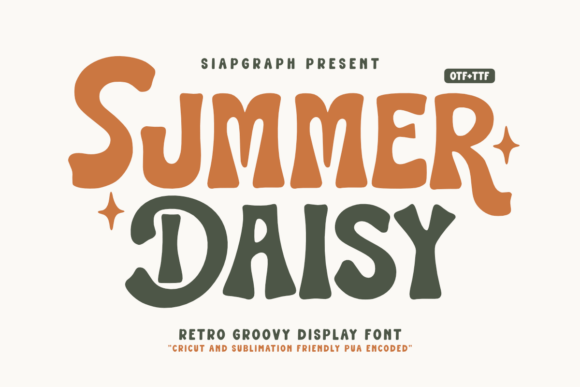
Summer Daisy Font Review
As a small business owner who spends hours designing labels, greeting cards, and packaging for my handmade candles, I’m always on the lookout for fonts that bring personality to my shop. Summer Daisy is one of those rare display fonts that feels like it was made just for makers like me. With its retro, groovy vibe and playful character, it’s perfect for adding a touch of whimsy to everything from candle labels to seasonal signs.
Summer Daisy for Candle Labels and Handmade Packaging
Testing Summer Daisy on a candle label was the first real moment I felt how this font can elevate simple products into something special. The rounded, slightly uneven strokes give it a handcrafted feel that pairs perfectly with wax-based items. I used it for a label on a lavender-scented candle, and the font’s soft curves and lively flair made the product feel more personal and inviting.
For packaging, I paired Summer Daisy with a clean sans serif for the ingredients list and pricing. This contrast kept the design from feeling too busy while maintaining a cohesive brand aesthetic. The font holds up well at smaller sizes, making it ideal for product tags or sticker sheets that need to be both readable and visually engaging.
Summer Daisy for Greeting Cards and Wedding Invitations
When I tried Summer Daisy on a wedding invitation mockup, the result was surprisingly elegant. The font’s retro charm doesn’t feel outdated—it adds a nostalgic, vintage appeal that works well with rustic or farmhouse-style weddings. I used it for the couple’s names and a “Save the Date” header, and it brought a warm, friendly energy to the design without overwhelming the layout.
On greeting cards, especially for birthdays or thank-you notes, the font’s playful nature shines. It’s great for short phrases, names, or decorative elements. However, I found that it doesn’t work as well for longer text blocks—its ornate details can become hard to read when stretched across multiple lines.
Summer Daisy for Digital Printables and Shop Listings
For digital printables, such as printable wall art or planner pages, Summer Daisy adds a unique visual identity that stands out in a crowded market. I designed a set of seasonal wall art using the font for titles and accents, and it gave the collection a cohesive, eye-catching look. The font’s versatility makes it easy to pair with other design elements, whether you’re creating a minimalist layout or a bold, colorful template.
In shop listings, the font helps create a clear visual hierarchy. I used it for product titles and headings, which made the listings feel more organized and professional. For listing images, I added a subtle overlay of the font on a background photo of a candle jar, and it helped draw attention to the product without distracting from the main image.
Summer Daisy for Boutique Tags and Merchandise Design
Boutique tags are another area where Summer Daisy really comes into play. Whether I’m labeling a handmade soap or a fabric pouch, the font adds a charming, personalized touch. I paired it with a simple serif font for the price and description, which created a balanced look that still felt creative and expressive.
On merchandise like tote bags or mugs, the font works best for short phrases or logos. I designed a tote bag with a “Hello Summer” message in Summer Daisy, and it turned out beautifully. The font’s size and spacing make it suitable for most printing methods, including screen printing and heat transfer.
Summer Daisy for Seasonal Crafts and Holiday Designs
During the holiday season, I experimented with using Summer Daisy for Christmas tags and gift wrap designs. Its retro style gave the projects a fun, nostalgic feel that fit well with a vintage-inspired theme. I also used it for a holiday sign that read “Merry & Bright,” and it looked great in both digital and physical formats.
For seasonal crafts like farmhouse signs or springtime banners, the font adds a sense of warmth and creativity. It’s not overly formal, which makes it perfect for casual, home-style projects. However, I would avoid using it for very small text, like tiny cut-out letters for a Cricut project, as some of the details might get lost in the cutting process.